Thursday, January 16, 2014

Hide A File Behind An Image

9:45 AM Posted by Unknown No comments
Protect Your Important Documents Behind An Image Without Any 3rd Party Software:-
Step 1:Compress the required file by any compression software like winrar.[Download Here] to compress the document just right click and select Add to archive or add to *.rar.


Step 2:-Select an image to be used for hiding the file behind it,then place the compressed file and the image in  the same folder.

Step 3:Open Command Prompt [Open Run and type cmd].

Step 4:Change to the directory where the files are kept  using cd command[I kept my files in the folder hide in the drive e].


Step 5:Then Enter the Following command copy /b image.jpg+secret.rar newimage.jpg
Step 6:-Now you can find a new image in the existing folder which hides that document.

Step 7:-Make The Image Read Only By attrib +R newimg.jpg


Now when you open that image you just find the actual image but not the document,inorder to access it Open Winrar and locate the image  double click it ,and you could find your secret document.

If You find any difficulties in locating the image in winrar just right click it and select open with and browse for winrar in your programfiles.
Comment Your Difficulties.

Tuesday, December 31, 2013

Schedule & Set Remainder for your email.

9:12 PM Posted by Unknown No comments
We can able to schedule our messages which are needed to be sent or received at a later time,using a simple extension called BOOMERANG. You Can download this  By Following The Link.
Boomerang offers you to schedule emails to automatically send in the future without needed to be in online.
By Clicking send later you can set your time and the mail will send automatically at the correct time without needing to be in online.
You can also set remainder for important messages so that it can be resend to you automatically at the desired time.
Open the message and just click boomerang button and set the needed time.
Then the message will be resend to you automatically at the desired time.

Friday, December 27, 2013

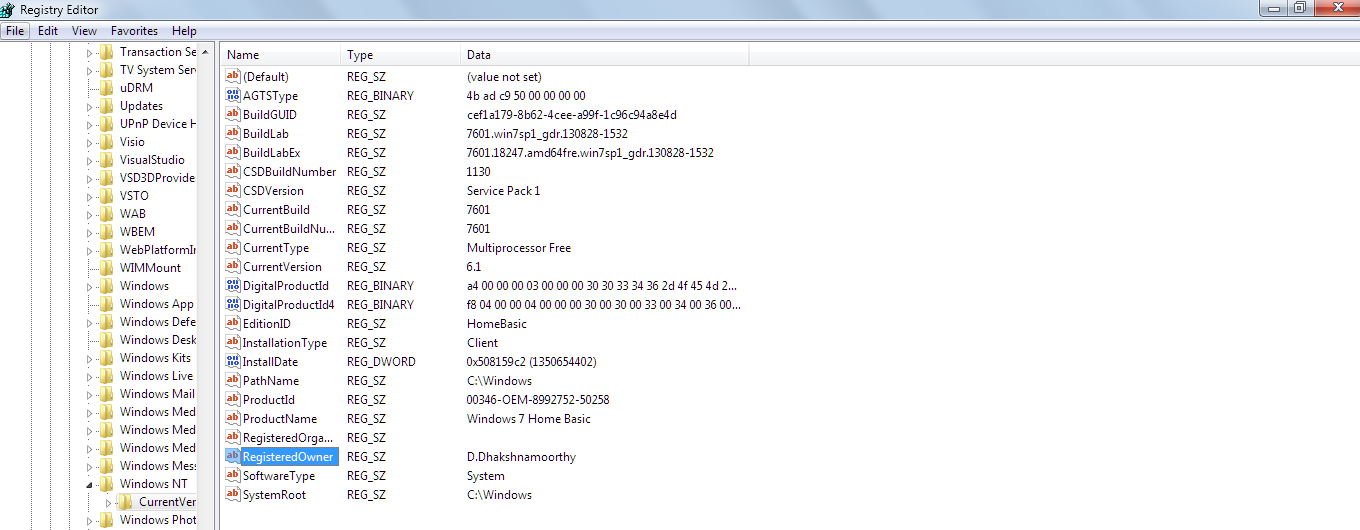
Change the registered owner in windows 7.

9:03 AM Posted by Unknown No comments
Ever wonder of changing the name of the person of whom the windows is registered to,it is not so useful but if you got a laptop from TN GOVERNMENT or from somebody else.
Here is the tip,just open the registry editor by pressing winkey + r and type regedit to open registry editor.
Then move to COMPUTER\HKEY_LOCAL_MACHINE\SOFTWARE\MICROSOFT\WINDOWS NT\CURRENTVERSION.


And Double Click Registered owner and
 type the desired name in the Value data textbox and click ok.
To check these changes type winver in run to see about the windows box.


Monday, December 23, 2013

Paint Your Folder

9:11 PM Posted by Unknown No comments
Bored of seeing a default folder look,need a personalisation tool to make your folder took look colorful,then your are at the right place.To Download the software just Click Here.
Install It, If You Wish any additional software from softorino then check the box else leave it unchecked.


Then Proceed the installation.After Finishing It Reboot the computer.
Then Just Right Click Any Of The Folder and select colorize! and select any one of the color and wait for few seconds thats it.
The Folder color was changed to the desired one & you can also restore it back to original look by pressing Restore original color option.


Any Doubts just comment it.

Wednesday, December 18, 2013

4000 English Words Essential For An Educated Vocabulary

8:20 AM Posted by Unknown No comments
English offers one of the richest vocabulary of all  languages because its words are culled from many languages,So here is the book which offers you some of an essential words which are commonly in use.
Are You Preparing For Entrance Examinations Like SAT,GRE,Need An Compact book for English Vocabulary then you will find this book so help-full.
To Download This  CLICK HERE.

Monday, November 25, 2013

Thursday, November 14, 2013

Increase Your Computer Speed With Pendrive..

10:01 PM Posted by Unknown No comments
Does low memory in RAM decreases your PC speed here is the way to overcome it(ONLY APPLICABLE FOR RAM SIZE LESS THAN 4GB).
Windows 7 introduces a  technique called ReadyBoost,applying Superfetch to the Pendrive.
Superfetch:-Usually Computer takes less time to run application from an memory instead of disks,soRAM is used as cache for frequently accessed application.Since our RAM size is small we can apply the same SUPERFETCH concept to our pendrive to store the frequent access applications.
At First You Must Increase Your Pendrive's Speed By Following these Steps
Step 1:-Right Click Your Pendrive And Move To  Properties,then select HARDWARE tab in properties dialog box and click Properties.


Then Select Policies tab and check the BETTER PERFORMANCE option and click OK
[NOTE:Use Safe remove in system tray or eject option to safe remove the pendrive.]
Then now click ReadyBoost tab and check use this device option and set the size recommended by the windows and Click OK.

Thats the end and you can notify some upgrade in the performance of your pc.

Saturday, November 2, 2013

Maze Lock At Startup

8:05 PM Posted by Unknown No comments
Ever wonder of locking your pc/laptop with maze lock if yes then try this XUS PC Lock Pro 4.2 with  serial key.
 Download Link.
If any queries comment it.

Friday, November 1, 2013

Bypassing adf.ly

8:43 AM Posted by Unknown No comments
Since India has blocked adf.ly,it was a huge trouble to download a hacked software.Inorder to overcome it we may use a third party website http://dead.x10.mx/dead/
For example:-

Now go to http://dead.x10.mx/dead/ and paste the link and click deadfly and at the bottom you may find the original url of the file to be downloaded.
Click and enjoy it....................