
Sunday, January 26, 2014


Friday, January 24, 2014
Test Your Talent Day 3
Answers For Day 2 Test Your Talent Click Here.


 Comment your answwers,Answers for these questions will be posted along with the next post.
Thursday, January 23, 2014
Test Your Talent(2nd Day)
For Day 1 Answers Click Here.
This section deals only with finding the odd one out.


 Answers will be published along with the next post.Comment your answers and discrepancies.
This section deals only with finding the odd one out.
Wednesday, January 22, 2014
Test Your Talent(Week-1 1st Day)
1st Week:-Spatial and Visual Reasoning.
These questions deals with a series of shapes or diagrams from which you have to pick up the odd one out,identify which could come from the set of alternatives or to find out the missing figures.
Check these 5 questions and comment your answers. Answers will be published shortly.


Thursday, January 16, 2014
Hide A File Behind An Image
Protect Your Important Documents Behind An Image Without Any 3rd Party Software:-
Step 1:Compress the required file by any compression software like winrar.[Download Here] to compress the document just right click and select Add to archive or add to *.rar.

Step 2:-Select an image to be used for hiding the file behind it,then place the compressed file and the image in the same folder.
Step 3:Open Command Prompt [Open Run and type cmd].
Step 4:Change to the directory where the files are kept using cd command[I kept my files in the folder hide in the drive e].

Step 5:Then Enter the Following command copy /b image.jpg+secret.rar newimage.jpg
 Step 6:-Now you can find a new image in the existing folder which hides that document.
Step 7:-Make The Image Read Only By attrib +R newimg.jpg
 Now when you open that image you just find the actual image but not the document,inorder to access it Open Winrar and locate the image double click it ,and you could find your secret document.


Step 1:Compress the required file by any compression software like winrar.[Download Here] to compress the document just right click and select Add to archive or add to *.rar.
Step 2:-Select an image to be used for hiding the file behind it,then place the compressed file and the image in the same folder.
Step 3:Open Command Prompt [Open Run and type cmd].
Step 4:Change to the directory where the files are kept using cd command[I kept my files in the folder hide in the drive e].
Step 5:Then Enter the Following command copy /b image.jpg+secret.rar newimage.jpg
Step 7:-Make The Image Read Only By attrib +R newimg.jpg
If You find any difficulties in locating the image in winrar just right click it and select open with and browse for winrar in your programfiles.
Comment Your Difficulties.
Tuesday, December 31, 2013
Schedule & Set Remainder for your email.
We can able to schedule our messages which are needed to be sent or received at a later time,using a simple extension called BOOMERANG. You Can download this By Following The Link.
Boomerang offers you to schedule emails to automatically send in the future without needed to be in online.
 By Clicking send later you can set your time and the mail will send automatically at the correct time without needing to be in online.
You can also set remainder for important messages so that it can be resend to you automatically at the desired time.
Open the message and just click boomerang button and set the needed time.
 Then the message will be resend to you automatically at the desired time.
Boomerang offers you to schedule emails to automatically send in the future without needed to be in online.

You can also set remainder for important messages so that it can be resend to you automatically at the desired time.
Open the message and just click boomerang button and set the needed time.

Friday, December 27, 2013
Change the registered owner in windows 7.
Ever wonder of changing the name of the person of whom the windows is registered to,it is not so useful but if you got a laptop from TN GOVERNMENT or from somebody else.


Here is the tip,just open the registry editor by pressing winkey + r and type regedit to open registry editor.
Then move to COMPUTER\HKEY_LOCAL_MACHINE\SOFTWARE\MICROSOFT\WINDOWS NT\CURRENTVERSION.
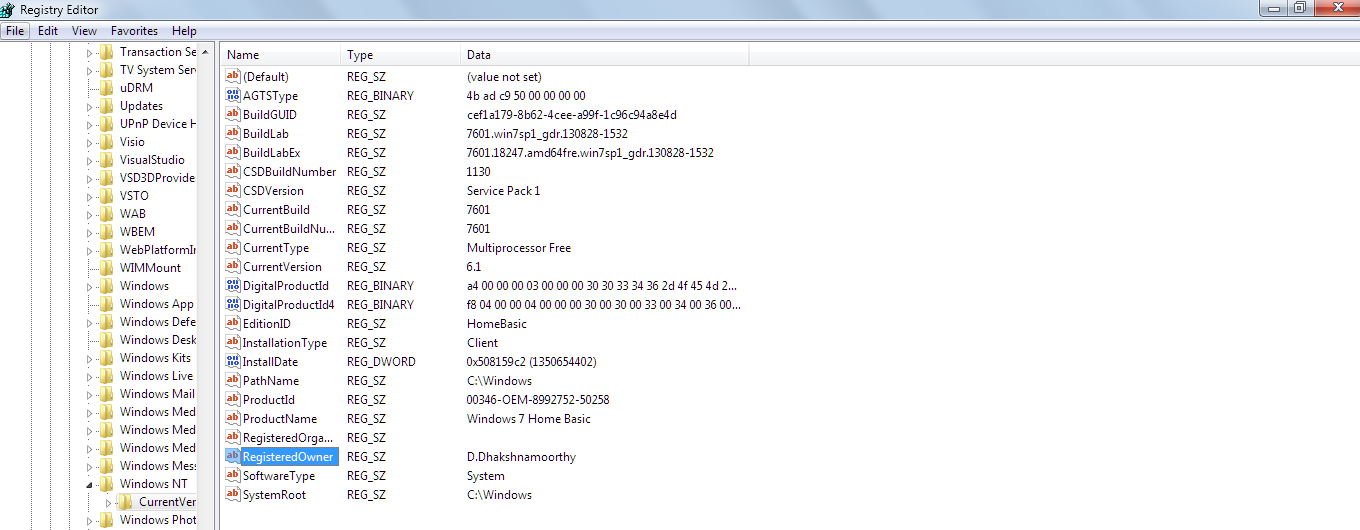
And Double Click Registered owner and

type the desired name in the Value data textbox and click ok.
To check these changes type winver in run to see about the windows box.
Monday, December 23, 2013
Paint Your Folder
Bored of seeing a default folder look,need a personalisation tool to make your folder took look colorful,then your are at the right place.To Download the software just Click Here.


Install It, If You Wish any additional software from softorino then check the box else leave it unchecked.

Then Proceed the installation.After Finishing It Reboot the computer.
Then Just Right Click Any Of The Folder and select colorize! and select any one of the color and wait for few seconds thats it.

Then Just Right Click Any Of The Folder and select colorize! and select any one of the color and wait for few seconds thats it.

The Folder color was changed to the desired one & you can also restore it back to original look by pressing Restore original color option.

Any Doubts just comment it.
Wednesday, December 18, 2013
4000 English Words Essential For An Educated Vocabulary
English offers one of the richest vocabulary of all languages because its words are culled from many languages,So here is the book which offers you some of an essential words which are commonly in use.
Are You Preparing For Entrance Examinations Like SAT,GRE,Need An Compact book for English Vocabulary then you will find this book so help-full.
To Download This CLICK HERE.
Are You Preparing For Entrance Examinations Like SAT,GRE,Need An Compact book for English Vocabulary then you will find this book so help-full.
To Download This CLICK HERE.